This is part 1 of the vSphere 6.7 Basics, detailing the installation and initial configuration of ESXi 6.7. Continue reading vSphere 6.7 Basics – Part 1 – ESXi Install
DECM-EA Success Suggestions
Yesterday, I defended Dell EMC Certification Master – Enterprise Architect (DECM-EA) for the second time and passed. This post has my recommendations to be successful, visit this link for the DECM-EA program overview.
Nutanix Test Drive Revamped
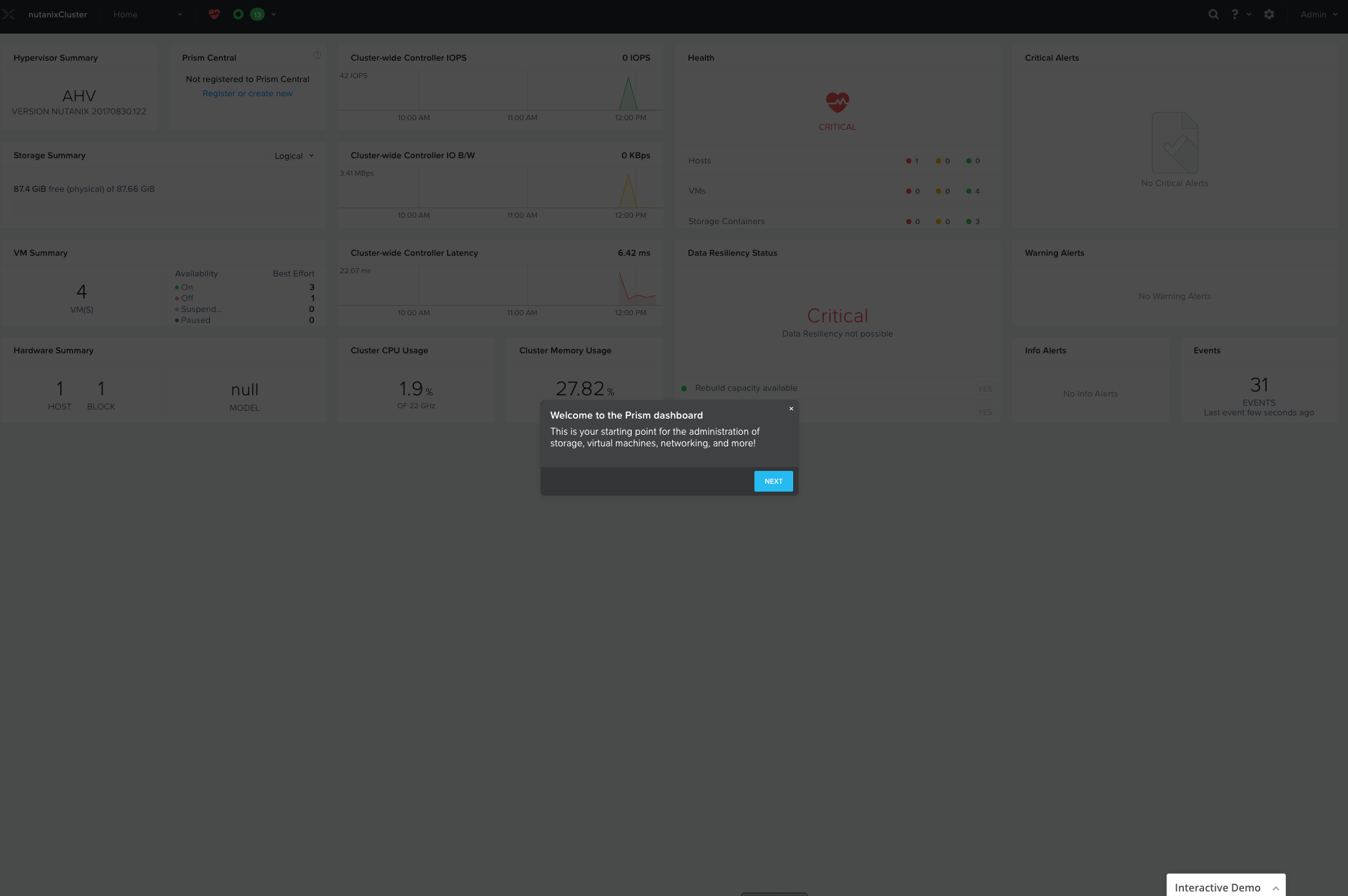
The Nutanix Test Drive environment has been revamped with a new look and feel. Gone is the Community Edition running on Ravello, it now uses the latest version of AOS and runs on GCP. There is also a helpful interactive storyboard that takes you through the Prism UI, which is great if this is your first time with Nutanix.
To access Test Drive:
- Visit the Nutanix Test Drive page
- Enter your details and press “Launch Test Drive”
- Take note of the admin credentials and press “Start Test Drive”
- Accept any SSL warnings and the Prism UI will appear
- Follow the Interactive Demo prompts to learn the Prism UI
- This instance is available to you for 2 hours
- Test Drive only covers Prism Element, the advanced features of Nutanix Enterprise Cloud are not included


vCSA 6.7 – Health Status Storage Alert /storage/archive
 This post is applicable to customers using the VMware vCenter Server Appliance (vCSA) 6.7.
Problem:
- vCenter Server Appliance 6.7 deployed and in use.
- Login to vSphere Client: https:// <IP Address or hostname of vCenter Server>
- vSphere Client System Configuration reports Node Health is Degraded. Access this page from Administration, Deployment, System Configuration.
- Login to vCenter Server Appliance VAMI: https:// <IP Address or hostname of vCenter Server>:5480
- vCenter Server Appliance VAMI Health Status reports an Alert for Storage: “File system /storage/archive is low on storage space. Increase the size of the disk /storage/archive.” Access this page from Summary, Health Status.
- VMware has not created an updated KB article explaining how to remediate this particular issue.
Continue reading vCSA 6.7 – Health Status Storage Alert /storage/archive
Nutanix .NEXT EU 2018 Announcements
This week, Nutanix .NEXT EU 2018 is being held in London. There are six announcements of note:
- Nutanix Xtract announcements:
- Xtract 2.0 GA Targeted for FY Q2
- Support for AWS as a source
- Performance enhancements to reduce migration time
- Installation & Upgrade improvements for 1-click experience
- AWS to AHV Customer Preview
- Migrate running EC2 instances to AHV
- Mini instance of Xtract deployed on AWS to orchestrate migration
- User VMs “instrumented” to determine change block tracks and AHV conversion
- Hyper-V to AHV Alpha
- Win 2012R2 and 2016 supported
- Alpha in progress and GA targeted for 1H 2019
- Xtract 2.0 GA Targeted for FY Q2
- Nutanix Era announcements:
- Era 1.0 is GA
- Supports Oracle 11.2.0.4 & 12.1.0.2
- Supports PostgreSQL 9.6 & 10.3
- Nutanix Karbon announced and in Tech Preview (on-prem Kubernetes)
- Nutanix Files:
- Version 3.2 November 2018 GA
- Nested Shares
- Larger Shares (140TB/share)
- SMB signing performance
- Version 3.5 December 2018 GA
- NFS v3 Early Access
- Multiprotocol Early Access
- File Analytics 1.0
- NFS self-service restore
- NFS Change File Tracking (CFT)
- Version 3.2 November 2018 GA
- Xi Leap DR service available in December 2018:
- North America only
- Offered as a cloud service with monthly, 1 year or 3 year subscriptions
- Sold directly and through channel partners
- Xi IOT service announced (no other details provided)
VCDX – Defending a Bad Idea
When defending VCDX is it easy to let your ego take control and force you to defend a bad idea. This post explains how to recognize that and recover from it.
VCDX – Levels and Focus
There are levels to this game. There is a significant amount of effort that goes into achieving your first VCDX, but I would argue that the level of effort and skill required for multi-VCDX is significantly more than the first. In addition, the amount of time for multi-VCDX is approximately 9-12 months of effort per track and it takes a laser focus to concentrate on the task at hand and ignore the “noise” around you.
 vcdx133.com