VMware Livefire for Partners and Employees

VMware offers employees and VMware Partners the opportunity to attend VMware Livefire advanced training each year. These are advanced courses where experts collaborate through training, lab exercises and discussions on how to implement enterprise-level VMware solutions.

VMware Livefire course catalog (as of writing – it constantly changes):

The value of attending:

  • Hands-on Lab access to latest VMware technologies, including VMC, AWS, Azure services (varies per track).
  • Training is aimed at experts who design and deliver advanced enterprise VMware solutions to the customer.
  • Great way to up-skill rapidly.
  • Normally you are required to attend an on-site class, however with COVID-19 you can attend virtual sessions, which is a really easy way to learn without the hassle and expense of travel.
  • You get an Acclaim badge for each 4-day Livefire course you attend and complete.

Requirements to be invited to attend:

  • Be a VMware Partner or VMware Employee.
  • Be VCP certified for the track you want to attend.

How it works:

  • VMware Livefire is offered for free. It does have an estimated $4K value.
  • Each 4-day/1-day session has limited seats (due to lab resources).
  • Courses are offered in three regions: Americas, EMEA & APJ.
  • Be invited by the VMware Technical Enablement Manager or Partner Business Manager in your region.
  • On the first day of course, you will be assigned access to the lab environments and manuals for the duration.
  • The Livefire teams assigned to each track (some are VCDX certified) spend a considerable amount of time updating and evolving the lab scenarios. So it is worth your time to attend updated Livefire courses every few years.
  • The Livefire team is not a service delivery function, you must use VMware PSO or Partner PS for this.

Performance Considerations when running Nutanix on vSphere

Here are some performance considerations for running Nutanix AOS 5.10 or higher on vSphere 6.7 U3b.

In vSphere 6.7 you may have noticed the introduction of Skyline Health (vSphere Client, vCenter Server object, Monitor, Skyline Health) and the reporting of the Compute Health Checks. You may have also noticed the informational alert in the ESXi summary tab that L1TF is present (vSphere Client, ESXi object, Summary tab). This is the VMware alert to mitigate CVE-2018-3646, a vulnerability in Intel processors; VMware KB 55636 covers it in detail. All of the other Skyline Health Compute Health Check alerts can be mitigated by using vUM to apply the latest ESXi security patches/ESXi driver updates and using Nutanix LCM to apply the latest Firmware updates.

In the screenshots below (via Nutanix X-Ray), the Random Write IOPS values (this metric correlates to CPU performance) for a Nutanix on vSphere cluster with SCAv2 enabled and disabled; if you do that math it is a 10% performance drop as advertised in VMware KB 55806. SCAv1 is a 30% CPU performance impact. If your organization deems L1TF to be a vulnerability that must be mitigated, build it into your cluster sizing calculations. Also consult with Nutanix Support on the correct CVM vCPU sizing, since Nutanix Sizer and Nutanix Foundation do not account for it.

If you decide to leave CVE-2018-3646 unresolved, you will have to delete the “Warning” Rule from the vSphere Health Alarm Definition (vSphere Client, vCenter Server object, Configure, Alarm Definitions, Filter “vSphere Health”, Edit), this removes the continuous “vSphere Health detected new issues in your environment” warning from vCenter Server (but leaves the “Critical” Rule in play). It is not possible to disable specific items from Skyline Health in vSphere 6.7, although you can disable Skyline Health entirely by leaving the CEIP.

If you have a node with 6-cores per socket (possibly to mitigate application licensing costs), be aware that Nutanix Foundation will deploy an 8 vCPU CVM that exceeds the NUMA boundaries of the 6-core Intel socket. Work with Nutanix Support to configure the “numa.nodeAffinity” setting for each Nutanix CVM.

Nutanix on vSphere must use NFSv3 Datastores. Make sure you account for the fact that the NFSv3 software in VMware vSphere 6.7 has a read performance limitation per host (approx. 130K Random Read IOPS @ 8K and approx. 2.12 GB/s Sequential Read @ 1M.). This can be mitigated by adding a second Datastore and spreading the vDisks of a Monster VM across two Datastores. You can also choose to use Nutanix Volume Groups instead of VMDKs (Guest OS iSCSI Initiator required with a Data Services IP on the Nutanix AOS cluster).

Not Quite Right Infrastructure Platforms

Have you worked with infrastructure platforms that were not quite right? Niggling little annoyances that do not impact delivering services but add that extra effort to get your job done? Things like self-signed SSL certificates, local user accounts and naming standards that make no sense.

These things translate into technical debt, that additional friction that makes it harder for an operations team to do their jobs effectively. When we add the time lost over the years the solution runs for, this amounts to hundreds of man-hours. The amount of effort to fix these things after an infrastructure platform is in production is so much harder than taking care of it when the platform was being built.

My message to the delivery architects and delivery engineers out there, as you are deploying your solutions, ensure you are making your infrastructure platforms as easy to own and operate as possible. Considerations such as:

  • SSL certificates from the company Certificate Authority: nothing screams “amateur” more than having to accept self-signed certificates in a Web browser. It only takes a little more effort to complete the CSR request and CER import process and this will save future operators years of mouse clicks to “Add Exception” for “Invalid Security Certificate” messages.
  • All infrastructure Syslog endpoints should point to a central Syslog server: Syslogs that are cached locally are of no use to you when that device is down for the count. A centralized syslog server gives you a time machine into holistically working out what happened with your entire infrastructure for a past event. Open Source Syslog servers like syslog-ng are free. If you are running vSphere, get licensed for vRealize Log Insight, the plug-ins for vSphere are built into the product.
  • All infrastructure management interfaces are integrated with AD and use RBAC via AD groups: Maintaining a bunch of local accounts with separate passwords for the different components of an infrastructure solution make no sense. Configure SSO for the entire solution, so that the operators can login using their domain credentials. Use AD groups for role-based access control, that way when a new employee joins the team, they are placed into the same AD group as their colleagues and they immediately have the access they need.
  • Common naming standard that is human readable: another pet peeve of mine, use a naming standard that applies to every facet of the infrastructure solution (App, Compute, Network, Storage, DR, Data Protection, Cloud, etc.). One that someone can read and instantly understand what they are looking at and does not require them to open a spreadsheet to decode an obscure alpha-numeric string.
  • Day-2 Lifecycle Management: most platforms now have some type of lifecycle management that allows the automated deployment of patches and updates. Design, build and test them as part of the solution. Do not leave this for the operations team to take care of after the fact. Things such as vRealize Suite Lifecycle Manager, vSphere Update Manager, Nutanix Lifecycle Manager. If you are designing a VMware SDDC, look at VCF with vSAN-Ready Nodes and VCF on VxRail or better yet, consider VMC on AWS. If you are going down the Nutanix route, take a look at Nutanix with AHV.

If you have other “Not Quite Right” examples, feel free to add a comment. Thanks for reading this far!

vUM Scan Cluster Error

This post is applicable to customers using VMware vCenter Server Appliance (vCSA) 6.7 Update 3d with vSphere Update Manager.

Problem:

  1. vCenter Server Appliance 6.7 Update 3d with vSphere Update Manager configured to scan a cluster of ESXi hosts. DNS is fully configured and functioning correctly for ESXi and vCSA.
  2. The Check Compliance action from the vSphere Client returns the error message: “There are errors during the scan operation. Check the events and log files for details.”
  3. In the /var/log/vmware/vmware-updatemgr/vum-server/vmware-vum-server-log4cpp.log file of the vCSA instance, there are “HostUpdateDepotManager” ERROR messages with http://<vcsa url>:9048/vum/repository/hostupdate/vmw/vmw-ESXi-6.7.0-metadata.zip – Name or service not known” listed.

Continue reading vUM Scan Cluster Error

vSphere Feature Request – Skyline Health for 3rd Party Arrays

As an Enterprise Architect working for a VMware Partner, I am involved in many vSphere Health Checks. One of the most common problems we report are incorrectly configured ESXi Advanced settings. In particular, the optimized configuration for legacy 3-Tier All-Flash storage. And the customer wonders why there are performance issues on their brand new All-Flash hardware platform?

It would be great if vSphere would allow Operators and Administrators to get this data from Skyline Health. VMware has already provided this for vSAN (ESXi Cluster object, Monitor, vSAN, Skyline Health) and general vSphere settings (vCenter Server object, Monitor, Skyline Health). Obviously the storage vendor would be responsible for providing those optimized settings, but it could be a part of the VMware Compatibility Guide certification process and added to Skyline Health?

Settings such as:

  • Storage Multipathing Policy
  • Host HBA Queue Depths
  • LUN Queue Depths

If you want to know more, go to your favorite storage vendor website and download their best practices guide for VMware vSphere:

VCAP – Where is my 2019 Badge?

Are you VCAP certified and wondering where the 2019 badge for your VCAP track is and why your current VCAP version is listed as “Emeritus”? You have passed the latest VCAP exam (before 2019) and you verified there is no new VCAP exam in the exam catalog, surely they would grandfather you in? Unfortunately, no – the certification policy has changed.

NOTE: I am focusing on 2019 as the case in point since the 2020 badges are having issues at the moment and it is not clear if a new 2020 exam for every VCAP will be released during 2020 (image below). In the first week of January 2020, I had 21 certifications awarded to me with the “2020” designation. I was excited and thought that VMware had fixed the certification logic; unfortunately, they were all revoked the following day (image below).

NOTE: I have opened a number of tickets with VMware Certification on this subject and sent a multitude of emails and currently there has been no policy change.

First, let me explain how it used to be. VMware Certification would release a new VCDX version approximately every 2 years, which would coincide with new VCAP Design and Deploy exams (previously known as the Administration exam) for that track. Originally there was only the vSphere/DCV track and then Cloud/CMA (vCD and later vRA), Desktop/DTM/DW (Horizon and then Workspace ONE) and NSX/NV (NSX-MH, NSX-v and then NSX-T) were added over time. We all understood the link to product versions and it worked.

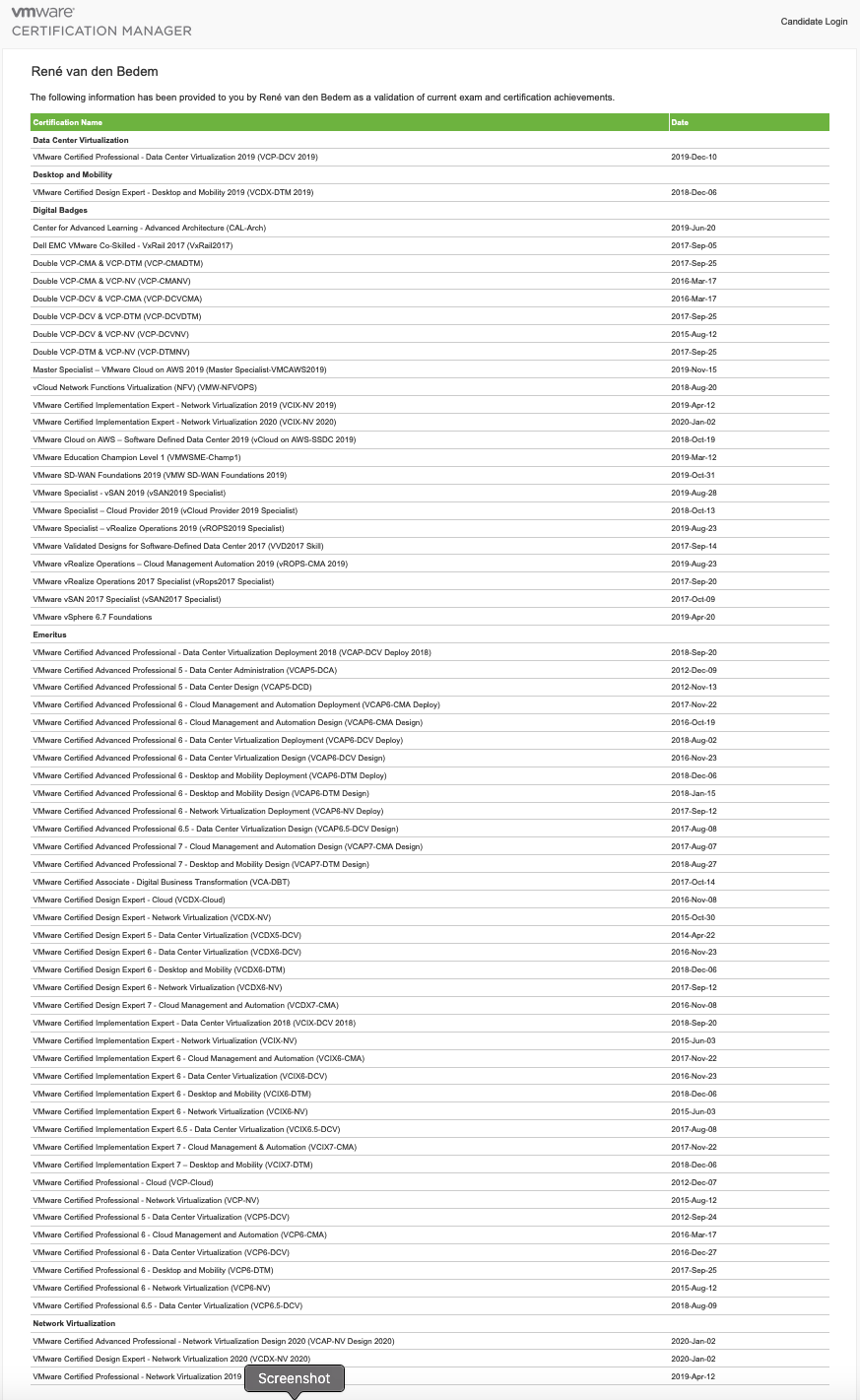
In 2019 (2018 for some DCV certifications), certification by product version changed to certification by year. Instead of VCAP6-DCV, we now have VCAP-DCV 2019 (and 2020). And this is being applied to every existing VMware certification (Associate, Specialist, Professional, Master Specialist, Advanced Professional and Expert).

If you look into the logic currently being applied:

  • You will not be grandfathered into the 2019 certification (even though you passed the latest exam in 2016, 2017 or 2018). “Grandfathering” logic has been used by VMware in the past, particularly with the NV track. In 2015, upon completing the VCIX-NV certification, you were automatically awarded VCP-NV in late 2015 and then upgraded to VCP6-NV and VCIX6-NV in 2016 without taking another exam.
  • You need to have passed the old exam after August 1, 2019 to be awarded the 2019 badge. Why was August 1, 2019 selected and not January 1, 2019 (as indicated in the blog I referenced above)? If I pass the pre-2019 exam in 2019 (older version of technology) how does awarding me a 2019 badge validate that I have been certified on the 2019 version of that technology?
  • You are not expected to retake the old exam you previously passed to achieve the 2019 badge. Which begs the question, how do I get my 2019 certifications if I have passed every exam that is available before 2019?
  • All certifications that are older than 2019 have been moved to “Emeritus” status.
  • This new policy does not align with the VMware Partner Central policy of recognizing many “Emeritus” certifications as being current (for Solution Competencies and Master Service Competencies). In fact, my VCDX and VCAP 2019/2020 certifications do not appear in Partner Central.
  • Resulting in a VMware transcript that gives the impression that your skill-set is not current. Which is unfair, since we (and our employers) spend a significant amount of time and money remaining current and this is short-changing certified individuals at the advanced professional level. Looking at my current transcript below, I have passed the every VCAP exam for every track (with the exception of VCAP-CMA Deploy 2018) and it looks like I am not current for DCV, CMA or DTM (I took the VCAP-NV Design 2019 exam in early 2020, hence the 2020 certs are listed)

It should be mentioned that VMware does a great job of releasing new VCP exams for every track each year (normally during February of each year). VCP 2019 does allow some “grandfathering” based upon free and paid courses.

What do I think needs to change?

  • Release advanced professional exams for every track every year. The typical incubation period for developing a single VCAP exam is approximately 1.5 years. I have been involved in this process and it takes a ton of work from a team of people. In my opinion, releasing these every year is not realistic.
  • Or change the logic to allow “grandfathering” for people who have achieved the current exams in previous years,
  • Or change the “Emeritus” logic to keep certifications derived from the latest exams current,
  • And align the VMware Certification and VMware Partner Central policies to match.

I have created a PDF that breaks down the upgrade logic for every 2019 expert and advanced certification – VCIX was ignored, since these are digital badges (located in VMware Certification Manager – see PDF for exact location). Some interesting points to note:

  • The VCAP-DCV Deploy and Design 2019 certifications list 2019 exams (3V0-21.19 and 3V0-22.19) that were never released.
  • The VCAP-CMA Deploy 2019 exam (3V0-31.19) is listed as active, but cannot be scheduled in the USA.
  • VCDX 2019 certifications for DCV, NV and CMA were never created.
  • The VCDX-DTM 2019 certification allowed an upgrade from VCAP7-DTM Design (did not enforce VCAP-DTM Design 2019).

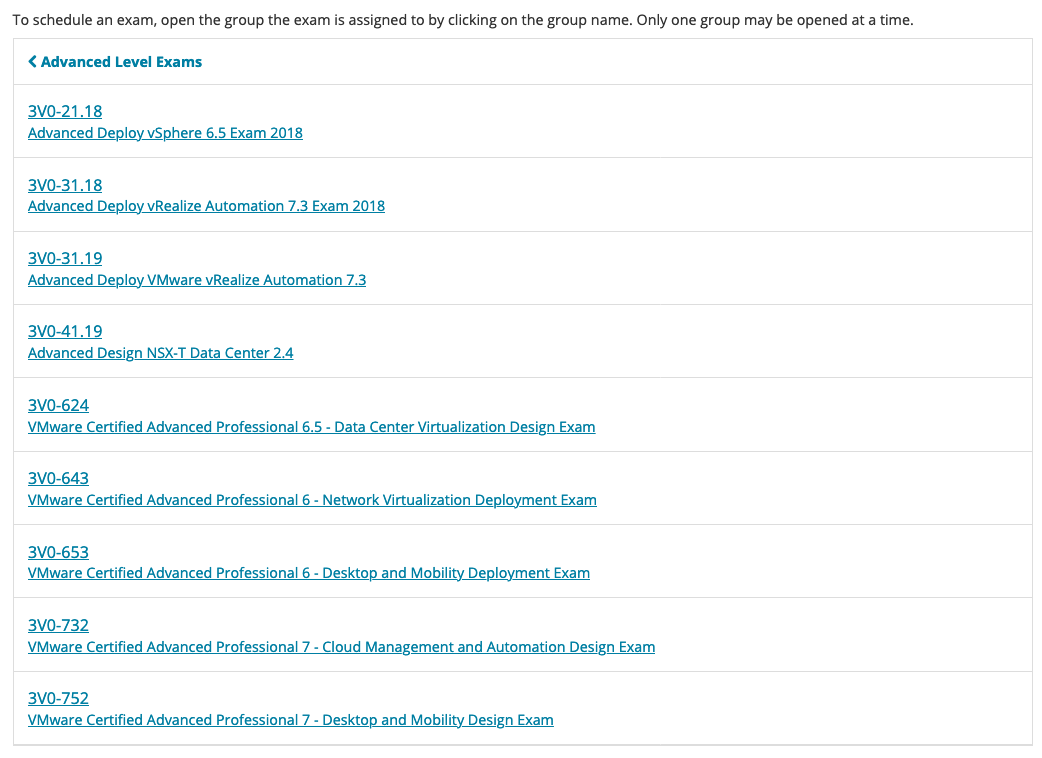
For completeness, here is the current list of VMware Advanced Professional exams (3V0-6nn – developed in 2016, 3V0-7nn – developed in 2017, 3V0-nn.18 developed in 2018, 3V0-nn.19 developed in 2019):

vSphere Feature Request – VM Hardware Wizard

As an Enterprise Architect working for a VMware Partner, I am involved in many vSphere Health Checks. One of the most common mistakes we report are incorrectly configured Virtual Machine Hardware settings.

In particular, business critical databases built with LSI Logic SAS with a single VMDK and an E1000 vNIC and NUMA boundaries exceeded. And the customer wonders why there are performance issues on their brand new hardware platform or VMConAWS SDDC?

It would be great if vSphere would allow Operators to follow a wizard for this type of build and not be an expert on the nerd-knobs of VM Hardware. Envision a “Business Critical App” option added to the “New Virtual Machine” Wizard. This removes the need for vSphere customers to have to read the best practices guides for Oracle Databases, MS-SQL Server, Cisco UC, SAP, EPIC, MediTech, etc. This would take care of the ParaVirtual vNIC, ParaVirtual vSCSI configuration, dedicated VMDKs for OS/APP/DB/LOG/TEMP, respecting NUMA boundaries, VM Latency setting, etc.

Imagine the tens of thousands of man-hours and open tickets saved by customers, partners and VMware if we had this feature?